STR ToolBox
ToolBox Jack, our STR AI assistant

More useful help starts with the real details.

Meet ToolBox Jack, our STR AI assistant—our jack-of-all-trades for STR questions, ideas and clearer writing. Give Jack your facts and a useful job; he can help you get from “where do I start?” to a draft or explanation you can check.

Market Smarter! Price Smarter! Book More!We don’t manage your property, we GROW it.

Talk to Jack like someone you are briefing.

A prompt is simply the question or instruction you give an AI assistant. Jack is an AI personality, not a person running your business. Tell him the property, audience, task and tone. He can help with listing copy, captions, newsletters, follow-ups, scripts, guest-message wording, pricing explanations and learning questions.

Your stepWhat to do
Jot the factsGive Jack accurate, non-sensitive details: the property, guest purpose, dates, amenities and the figures you want explained. Keep private entry codes and guest identities out.
Ask for helpChoose an output you can use: three headlines, a short arrival answer, a comparison of supplied figures or questions to investigate.
Check the detailsReview facts, arithmetic, dates, permissions and tone. For pricing explanations, supply reviewed Mashvisor, PriceLabs and AirDNA context from the available workflow rather than asking him to invent current data.
Keep it usefulRefine the draft, save your approved wording and use the proper publishing or sending workflow. Jack’s draft does not itself send an email or change a booking-channel rate.

Picture this at your property

Example prompt, not a captured Jack response: “My cabin sleeps six, has a fenced yard and covered porch, and these are the dates I want to promote. Write three warm social captions for guests traveling with dogs. Use only my property details, leave room for my booking link, and tell me what information is missing.”

A quick question for you

What makes Jack’s first draft more useful?

Choose the next step
See the answer and why

Specific property facts and a clear request. Facts and purpose give him something useful to work with. Your review turns the draft into a message you can stand behind.

A dedicated assistant beyond the caption box.

Jack can help with onboarding questions, product guidance, walkthroughs and useful next steps during your session. Ask a specific question or bring the property details into a draft you can review.

Use checked AirDNA, PriceLabs and Mashvisor figures from the pricing workflow when asking for explanations. Provider names do not mean Jack independently retrieves every provider figure or verifies current facts.

Freemium includes five total Jack uses per account, with no reset. All education remains free; paid Jack allowances follow the selected plan.

An AI assistant for the work behind vacation rental marketing.

The time-consuming part is often deciding what to say—and then saying it again for another channel.

Give ToolBox Jack the real amenities, the traveler you want to reach and the action you want them to take. Ask for several angles, choose the strongest and refine it. A fenced yard can support a dog-friendly stay story; a separate desk can give a midweek-work campaign a practical focus. The details do more work than another enthusiastic adjective.

Jack helps with the repeated writing and explanation inside our STR Tech Stack. You bring the property knowledge, taste and final decision. That is how AI can save preparation time without making every rental sound as though the same very excited robot decorated it.

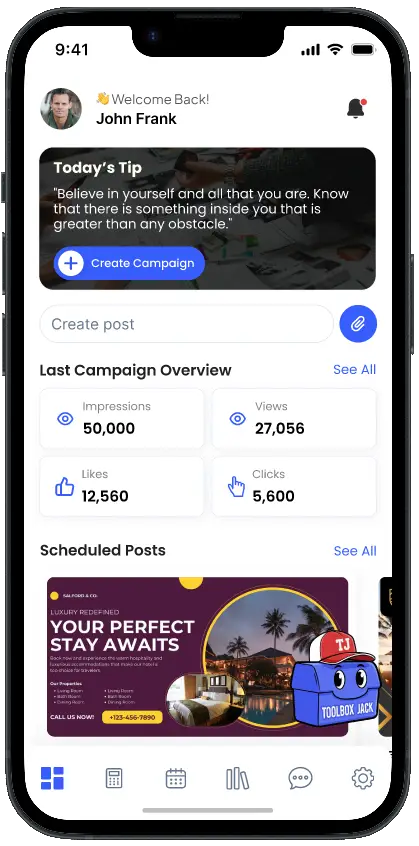
STR ToolBox app dashboard with campaign and content tools
STR ToolBox interface preview. Sample dashboard figures are illustrative.

One assistant. Several useful jobs.

PROPERTY STORY

Listing titles and descriptions

Paste existing copy or supply the facts. Ask Jack to identify the strongest guest benefits, suggest title options and draft an opening that suits the property. Keep the copy consistent with your photos and actual amenities.

Explore AI Listing Optimization →
SOCIAL CONTENT

Social captions and content ideas

Turn one amenity or travel occasion into distinct captions. Ask for a short version, a warmer version or a different opening. Give each post a reason to exist instead of posting “book now” until the porch becomes a celebrity.

PAST-GUEST CONNECTION

Newsletters and follow-ups

Supply a completed improvement, checked destination update or genuine offer. Ask for subject lines and short sections that link to the relevant blog or property page. Personalize and send through your established email platform.

EVERYDAY WRITING

Messages and review replies

Prepare a clear answer to a property question or a thoughtful review reply. Include only the facts needed for the task, remove private guest information and review the wording before you send it yourself.

CLEARER DECISIONS

Pricing explanations

Bring the figures you have already reviewed in the pricing tools. Ask Jack to explain assumptions and differences in plain language. Current market context comes from Mashvisor, PriceLabs and AirDNA where available; the host decides what to do.

STR EDUCATION

Learning and next steps

Ask for an explanation, a beginner learning plan or a small task to practice. Follow up when a term is unclear. Learning short-term rental marketing is easier when the explanation starts with your actual question.

See Jack explain a practical pricing question.

In this recorded app example, Jack explained why a full calendar does not automatically produce the most room revenue.

The demonstration used illustrative inputs: 30 available nights, 18 occupied nights and a $200 average daily rate. These were teaching assumptions, not a customer’s reported results.

The example supplied to Jack

Thirty available nights. Eighteen booked. $200 per occupied night.

  • Gross accommodation revenue: 18 × $200 = $3,600.
  • Occupancy: 18 ÷ 30 = 60%.
  • Revenue per available night: $3,600 ÷ 30 = $120.

These figures exclude expenses, taxes, fees and financing.

Recorded in-app example using illustrative teaching inputs. Use current property facts and market context for your own decisions.

A useful prompt has five ingredients.

  1. Property: type, capacity and location context relevant to the task.
  2. Facts: amenities, photos, dates or figures you have checked.
  3. Audience: who the stay suits and why.
  4. Task: a caption, title, email, explanation or plan.
  5. Voice: warm, concise, practical, lighthearted—or another tone you choose.
Example prompt to personalize:

“My two-bedroom cabin sleeps six, welcomes dogs and has a fenced yard and covered porch. Draft three different captions for families traveling with dogs. Focus each on one real benefit, keep the tone warm and include my booking link. Ask me about any missing facts instead of inventing them.”

Use a follow-up to improve the draft: “Shorter opening,” “Less formal,” “Keep the fenced-yard detail,” or “Give me a version for a past guest.” A precise revision is usually more useful than starting over with “make it better.” Even Jack appreciates a little direction.

Turn one property improvement into a connected campaign.

01

Start with the real change

Describe the completed amenity and upload current photos to your media workflow. Explain which guest would value it. If the patio is finished, say so; if it is still a pile of paving stones, keep the ribbon-cutting caption for later.

02

Ask for related drafts

Request a listing paragraph, a social caption, a short video text sequence and a newsletter introduction using the same facts. Choose formats you will actually use, rather than collecting drafts as a new hobby.

03

Review, create and schedule

Check the claims and voice, pair copy with the right media and use the Content Calendar for supported social publishing. Review and send newsletter content through your existing email platform.

That is the convenience: the property story stays connected as it moves into different formats. Less repeated explanation, fewer disconnected writing tasks and more room to focus on the guest you want to reach.

See the content and scheduling workflow →

Get useful help while keeping your judgment.

Read a draft as though a guest will take every sentence literally—because they might. Check amenities, distances, availability, prices, offer terms and destination information. Ask for the reasoning behind a calculation and verify the numbers. Do not put passwords, payment details or unnecessary personal guest information into a prompt.

Jack helps you draft and learn. You publish the listing, send the message, choose a campaign budget and decide whether to change a rate. Important legal, tax and investment questions still need the appropriate qualified advice.

Conversations can build on the current session. Keep a copy of important property facts and approved text in your own workflow; do not assume the assistant remembers every previous conversation.

Jack questions, answered.

How much Jack access comes with Freemium?

Five total uses per account, with no daily or monthly reset. Freemium also includes general news, free ToolBox U education and general community. Paid-plan access is shown in the plan comparison and app before purchase.

Is the example above an actual Jack answer?

The quoted explanation is from a recorded app demonstration. Its property-performance figures are illustrative inputs. Other prompts on this page are examples for you to personalize, not recorded replies.

Can I ask about an Airbnb or Vrbo listing?

Yes. Supply your existing wording and accurate property details. Jack can help with drafts and ideas. You review and publish changes in your chosen listing platform; automatic listing updates are not promised.

Does Jack send messages or operate my property?

No. Jack assists with writing, explanations and guidance. The host remains responsible for messages, publishing, pricing decisions and guest operations.

How is Jack connected to the rest of ToolBox?

Use the same property facts to draft listing copy, captions, video text and newsletter ideas, then carry the approved content into the relevant media, campaign and scheduling workflow.

Can a real estate professional use Jack?

Yes. Bring verified property facts and clearly labeled revenue, cost and financing assumptions. Jack can help explain supplied figures and prepare a client-friendly outline. Scenarios do not guarantee returns or replace professional due diligence.

Give your next marketing hour a head start.

Choose one property and one useful task. Explore our STR Tech Stack, compare the plans and stay in the loop for the app release.

Market Smarter! Price Smarter! Book More!We don’t manage your property, we GROW it.

Jack’s place in your ToolBox.

Jack sits inside our host-growth approach: use your property facts for a draft, your checked numbers for an explanation and a specific goal for the next step. Bring the result into the listing, content plan or pricing decision you are working on.

ToolBox Jack: Our STR AI Assistant for Hosts & Agents

Get a useful first draft without giving the blank screen your whole evening.

What you can do with this feature

Jack is our STR AI assistant for questions, explanations, marketing drafts, newsletters and follow-up wording. Ask for help understanding a feature, finding a starting point or breaking a task into manageable steps. The original enhancement describes session context; do not assume permanent memory or that Jack has run another tool.

How to use the workflow

Give Jack the property/client situation, verified facts, intended audience, task and constraints. Ask for a specific output: three headline options, a short explanation, a newsletter outline or questions to investigate. Read the response, check factual claims, refine it and use the approved result in the right workflow.

See it in a real task

Illustrative longer-stay inquiry: a furnished-apartment host is considering how to describe verified blackout blinds, parking and distance to a hospital for a shift-working traveler. Give ToolBox Jack those checked facts and ask for clear wording and questions still to investigate. Do not assume every healthcare traveler wants the same amenities or that a longer stay avoids local legal requirements.

Where the time savings come from

Reduce first-draft writing and the effort of organizing a specific question. Keep responsibility for accuracy, permissions and the final decision. Freemium provides five total uses per account with no reset; paid allowances must match current plan details.

Find the plan for this workflow